

Zimbra Features

Zimbra Zimlets : The Ultimate Guide to Customizing Business Email
What is a Zimbra Zimlet?

A Zimbra Zimlet is a small software add-on or extension. It allows your Zimbra Webmail system to connect and talk to third-party software applications. Think of a Zimlet like a plugin for your smartphone. By adding a Zimlet, you can unlock new tools, automate tasks, and complete extra work without ever leaving your main email screen.

For many businesses, shifting between different browser tabs to check a map, track a package, or schedule a calendar invite wastes valuable time. Zimlets solve this problem. They create a “mash-up” of your favorite work tools directly inside your email user interface.

By default Zimbra Zimlets is available out of the box deployment and pre-defined, such as:

  • Dropbox
  • Slack
  • Nextcloud
  • Zoom
  • Jitsi
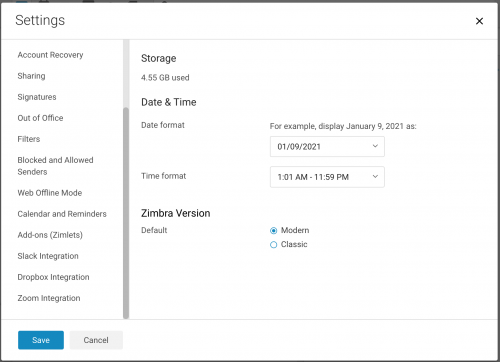
Zimlets Webmail Interface

How Zimlets Enhance Your Daily Business Productivity

Zimlets are built to make your business communication faster and easier. Instead of cutting and pasting data from an email into an external browser window, Zimlets read important text in real-time. This allows users to complete tasks instantly using two main tracking methods:

1. Hover Previews (Mouse-Over Actions)

When you move your mouse cursor over specific words in an email message, a Zimlet can show you real-time data previews inside a small pop-up bubble:

  • Physical Addresses: Hover over an address to see a local map or get accurate driving directions.
  • Dates and Times: Hover over a specific time to view your personal calendar availability for that day.
  • Names & Contacts: Hover over an email address to see saved phone numbers and details inside your corporate address book.
  • Business Metrics: Hover over a tracking number, part serial number, or stock equity to check inventory and shipment status immediately.

2. Right-Click Quick Actions

Right-clicking a piece of information allows you to launch instant workflows. You do not need to open a separate application:

  • Phone Numbers: Right-click a number to make an instant voice call using a softphone or VoIP application.
  • Meeting Requests: Right-click a date mentioned in an email text to instantly schedule a formal corporate meeting.
  • Data Security: Right-click an unknown sender to verify security tokens or update internal contact records safely.

Key Examples of Enterprise Zimlets

The Zimbra framework supports a massive ecosystem of external software integrations. Some of the most common productivity tools used by corporations include:

  • Video Conferencing Plugins: Integrations with systems like Zoom or BigBlueButton let you inject calendar meeting links directly into invites with a single click.
  • Cloud Storage Connections: Sync your email attachments directly with secure cloud drives like Dropbox or Zimbra Drive to save local server storage.
  • Data Loss Prevention (DLP): Advanced security Zimlets actively check out-bound emails. They warn employees if they are accidentally sending out sensitive corporate data like credit card or registration numbers.
  • Custom Headers: Specialized system administration tools can inject specific email security tags to ensure compliance with strict local privacy frameworks.

How to Deploy and Manage Zimlets on Your Server

Zimlets are packaged as lightweight .zip files containing all necessary backend scripts and code assets. A system administrator must handle deployment using the Zimbra Command Line Interface (CLI).

The Core Deployment Commands:

To install a new Zimlet file across your network, an IT administrator logs into the mail server as the zimbra user and executes the following core command sequence:

  • Deploying the Asset: zmzimletctl deploy

  • Restarting Mailbox Services: zmmailboxdctl restart

Running this automation creates an entry in your LDAP directory server and copies the file system scripts to each node. Administrators can also grant or deny access to specific groups of users based on their Class of Service (COS) profiles using Access Control Lists (ACLs).

Why Choose Cloudhappen to Manage Your Zimbra Assets?

Managing custom mail environments requires deep technical expertise. As a leading Zimbra provider in Malaysia, Cloudhappen Global Sdn Bhd specializes in maintaining stable, secure private cloud architectures.

Our engineers provide professional migration, setup, performance tuning, and custom Zimlet integration services for large email deployments, including banks, universities, and government institutions. We ensure your business communications stay online, fully compliant with local data sovereignty laws, and optimized for maximum staff productivity.

Talk to our expert here and get your questions answered.

Frequently Asked Questions About Zimlets (FAQ)

Do Zimlets work on mobile web browsers?

Yes. Modern versions of Zimbra feature a responsive UI framework based on React technology. This allows custom Zimlets to adjust layout sizes cleanly across desktops, tablets, and smartphones.

Yes. Every default installation includes standard core extensions for basic calendar mapping, phone number recognition, and internal contact linking.

Yes. Server administrators can use Class of Service (COS) command line controls to disable access for certain staff tiers without removing the software from the main system server.

Zimlets is a framework that can integrate with third party applications. In effect users can access to third party apps within the Zimbra Webmail Client. That is to say Zimbra can interact with third party apps. It was build to enhance the user experience with Zimbra’s Web Client. Some of these Zimlets enhance the user experience while in their email messages, letting them click on the following type of text. By default Zimbra Zimlets is available out of the box deployment and pre-defined, such as:

  • Dropbox
  • Slack
  • Nextcloud
  • Zoom
  • Jitsi

Zimlets Webmail Interface

Zimlets Use Cases

Organisation that has specific needs will find this useful for integration and compliance purpose. In other taking full control. For example to integrate with a CRM Software such as Salesforce. Hence improving collaboration among staff and customers. For this reason a user can navigate from a single user interface.

There are time when a user might forget to attached a file to an Email. Consequently spending more time and resources. This in other words reduce productivity. Therefore simple task can be solved by integrating Zimlets to work with it.

Jitsi a video conferencing software that can be integrated to your own instance. In other words your own private video conference channel. Jitsi is a set of open-source projects that allows you to easily build and deploy secure video conferencing solutions. 

Since Zimbra Collaboration is an open core Email collaboration software. Zeta Alliance was formed among Zimbra users, partners and contributors to improve Zimbra Platform. Therefore to help ensure a long term success and health as an open source project. There are Zimbra/Synacor within the founders group of the alliance.
 
To gather more information on Zimbra Zimlets please visit the following links.
 
To find out more about how various Zimlets can help your organization please visit https://gallery.zetalliance.org/extend/
Tommy Chong

Author

Tommy Chong