

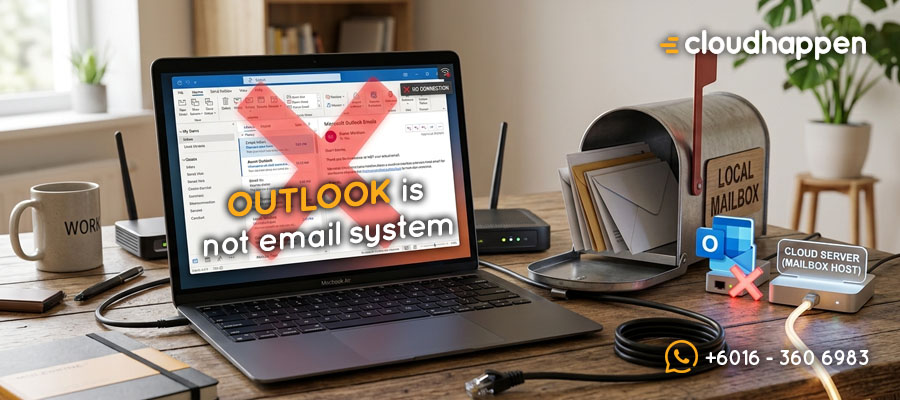
Outlook is NOT Your Email, It’s Just An Email Client
If u want to know is Outlook an email client or an actual email provider, here is the short answer: Microsoft Outlook is NOT your email system. It is simply a software application on your desktop or phone. Don’t be mistaken that it’s your email.
Picture this common Monday morning workplace drama.
Jessie opens her laptop, clicks the blue Outlook icon, and sees a red error message: “Cannot Connect to Server.”
She immediately panic. They call the IT support desk screaming, “Our email server is down! We lost all our company emails!”
The IT administrator ask her to check using the webmail, Jessie replied “You mean check Zimbra see working or not?”.
U see, to many users out there, Webmail = Zimbra, Gmail, Yahoo or Hotmail. That’s their definition of Webmail.
When she login the webmail. it shows that all her emails are sitting right there — safe, secure, and completely untouched.
The server was never down. The company email was never lost. The only thing that broke was the desktop app sitting on the employee’s laptop.
This mistake happens every single day in offices worldwide because Microsoft spent decades making everyone believe the blue “O” icon is their email.
The Main Explanation: The Post Office vs. Your Front Gate Mailbox
To understand why Outlook is not your email, think about how real physical mail works in the real world:
- The Email Server is the Central Post Office Building.
This is the real system. Whether u use Zimbra, Google Workspace, cPanel hosting, or Microsoft 365 Exchange, the server is the physical building where yr emails are delivered, sorted, scanned for viruses & safely stored in data vaults. - The Outlook App is Just the Metal Mailbox on Your Front Gate.
The Outlook app installed on yr computer is just a local metal container. It holds letters for u to look at. It does not create the mail, and it does not store the master copies. - Webmail is Walking Directly into the Post Office.
When u open a web browser (like Firefox, Chrome or Edge) and go directly to yr webmail address, u are walking straight into the Central Post Office building. If yr letters are inside the Post Office, your email system is 100% healthy.
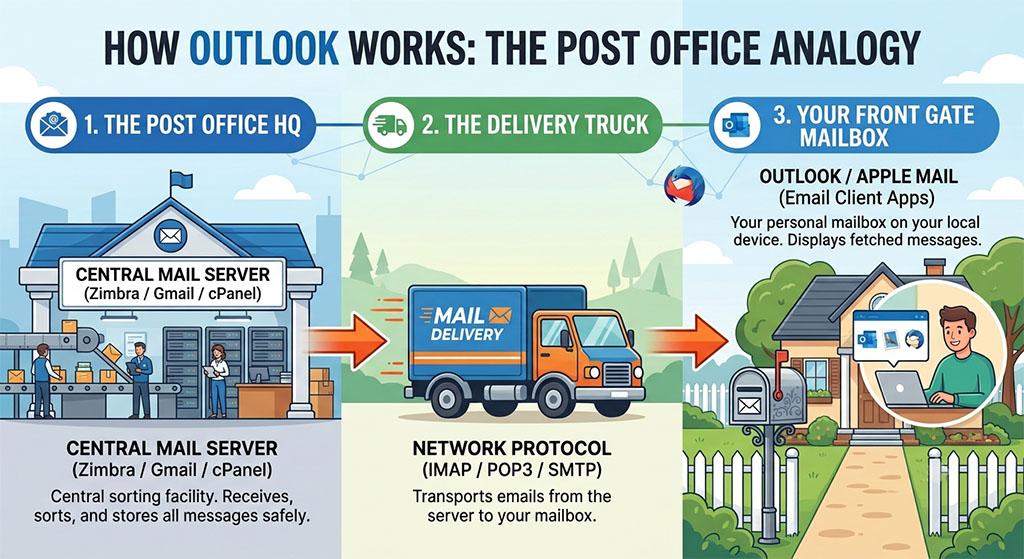
🚨 Important Note : Microsoft Outlook is fundamentally no different from Apple Mail or Mozilla Thunderbird. They are all simply client applications designed to fetch and display messages from a remote mail server. Just as opening Apple Mail on an iPhone doesn't mean Apple hosts your domain, opening Microsoft Outlook on a PC doesn't mean Microsoft is running your underlying email server.
Running Gmail and Yahoo Inside Outlook, so is outlook an email client?
If Outlook were actually an email provider, it would only work for Microsoft accounts.
But u can take a standard @gmail.com address, a @yahoo.com address, or a company @yourbrand.com address hosted on a local Zimbra cloud, and connect it directly into the desktop Outlook app.
Why? Because Outlook is just a window viewer. It displays data pulled from whatever backend mail server u connect it to.
The "Outlook Login" Confusion: Webmail vs Desktop Client
When people search Google for outlook login or outlook 365 login, they often get confused between software apps and web portals.
- Opening the Outlook App : U are opening a local software program on yr Windows PC or Mac. If the app freezes, your local computer has a glitch.
- Using Webmail / Browser Login : U are logging straight into the live server.
If yr desktop app stops working, u don’t need 2 panic. Simply open yr web browser, log into yr webmail & keep working while IT fixes yr local app profile.
How to Set Up a Professional Email Account in a Desktop Mail Client
When u configure a new company email, Outlook asks u to enter technical details like IMAP, POP3, or SMTP server settings.
This step proves Outlook is just an email client. Because it is an empty software shell, u must explicitly tell it the precise address of yr central post office server so it knows where to go and fetch yr messages.
Troubleshooting Email Not Syncing on Mobile App and Desktop
When yr emails stop arriving, staff often complain that the mail host failed. But in reality, troubleshooting email not syncing usually comes down to local software glitches:
- Corrupted Local Data Files : The local .pst or .ost file saved on yr hard drive got overloaded.
- Password Updates : You changed yr password on yr phone, but forgot to update the saved credential inside yr desktop app.
- App Updates : A Windows update changed yr local network port settings.
In all three cases, the main email server was running without any issues. Only the connection between your gate mailbox (Outlook) & the post office truck got disrupted.
Stop Blaming the Server for Client App Problems
Understanding the difference between an email client and an email server saves businesses thousands of ringgit in wasted support time.
The next time yr desktop screen displays a send/receive error, remember the golden rule: Check yr Webmail first. If yr mail is there, yr mail server is working perfectly — yr Outlook app just needs a quick tune-up.
Moral of the Story
- Outlook is a Client, Not a Server : Microsoft Outlook is desktop/mobile application software (a client) that displays messages stored on a central mail server.
- Webmail is Your Truth Benchmark : When experiencing email delivery errors, log into your web browser (Webmail) first. If your messages are there, your mail server is completely fine.
- Local Apps Cause Most Glitches : Send/receive errors, syncing delays, and password prompts are usually caused by local corrupted data files (.ost/.pst) or app settings, not a crashed mail server.
FAQs : What Email System Complies With Malaysia PDPA?
Microsoft Outlook (the application installed on your PC, Mac, or phone) is an email client, not an email provider. It is software designed to fetch, display, and organize messages from a mail server. An email provider (or host) is the underlying server system (such as Microsoft 365 Exchange, Zimbra Local Cloud, Google Workspace, or cPanel) that actually stores, sends, and receives your email data.
es. Because Outlook is just an email client application, you can connect almost any email service to it using standard mail protocols like IMAP, POP3, or Exchange Sync. You do not need a @hotmail.com or @outlook.com address to use the Outlook desktop software.
This error usually means the connection link between your local Outlook App (the email client) and your remote mail server is interrupted. It is rarely caused by a total server crash. Common causes include an expired local password, corrupted local Outlook profile files (.ost/.pst), or local firewall/network updates blocking Outlook's access ports. Checking your Webmail via a browser will quickly verify if your mail server is running normally.

Author
Kim (M365 Specialist)
Meet Kim, Cloudhappen's lead Digital Specialist. She has 15 years of hands-on infrastructure experience. Starting as a certified webmaster, she has successfully managed everything from custom VPS networks to advanced enterprise email security frameworks. Today, she functions as an approachable tech translator for local business owners - listening closely to their challenges & delivering direct, zero-jargon M365 solutions with prompt support.