
Demystifying DMARC: Why This Email Security Essential is Non-Negotiable
Why implementing what is DMARC is now mandatory.
When I started designing email infrastructure over 30 years ago, the internet was a much friendlier place. Mail servers trusted each other implicitly, and configuring a system was largely about ensuring a message traveled from Point A to Point B.
Fast forward to today, and the email landscape is unrecognizable. Bad actors can effortlessly impersonate your corporate domain to scam your customers, trick your employees, and ruin your brand’s hard-earned reputation.
If you are an IT Manager or Administrator tasked with keeping your company’s communication secure, there is one acronym you can no longer afford to ignore: DMARC. But what is DMARC, and why is it suddenly an industry requirement?
Let’s break down exactly what DMARC is, why it has become mandatory, and how it protects your organization—in plain, simple English.
What is DMARC? (The Corporate ID Analogy)
DMARC stands for Domain-based Message Authentication, Reporting, and Conformance.
Think of DMARC as a digital passport control system for your company’s email domain. Before DMARC, anyone could scribble your domain name (@yourcompany.com) on an email envelope and send it out. Receiving servers had no reliable way to verify if the message actually came from you.
DMARC solves this by acting as the supervisor for two older, foundational email security tools:
- SPF (Sender Policy Framework): A public guest list of every server authorized to send emails on your behalf.
- DKIM (DomainKeys Identified Mail): A unique, cryptographic digital signature attached to your emails, proving the message wasn’t tampered with mid-transit.
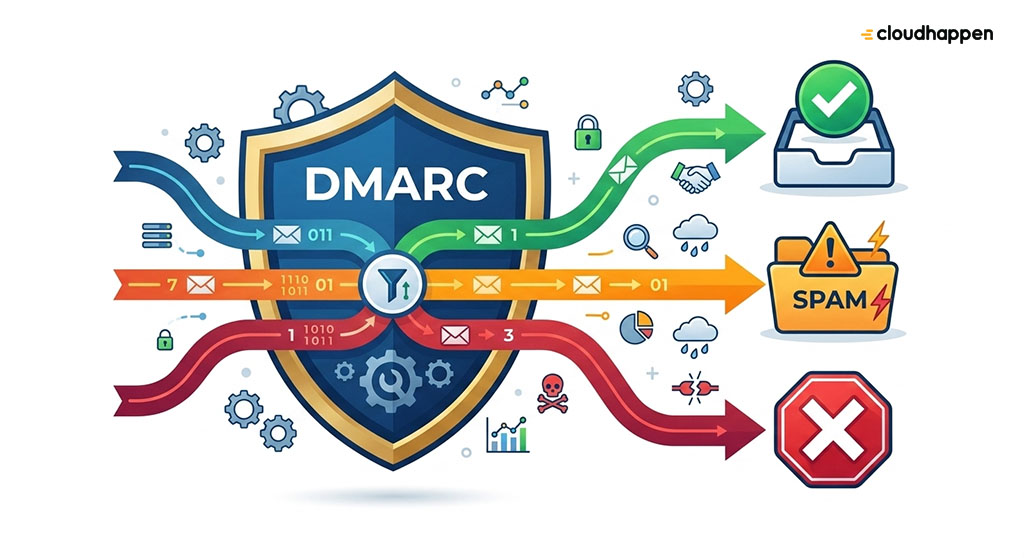
While SPF and DKIM are great, they have a major flaw: they don’t tell the receiving server what to do if an email fails the test. DMARC bridges this gap. It allows you to publish a clear rulebook (a policy) in your DNS that tells the world exactly how to handle unauthorized emails claiming to be from you.
The Three Levels of DMARC Policies
When you configure DMARC, you can choose how strictly you want receiving servers to enforce your rules. There are three primary policy levels:
DMARC Policy | What It Does | Best Used For |
p=none (Monitoring Mode) | The email is delivered normally, even if it fails authentication. You receive reports showing who is sending mail using your domain. | Step 1: Gathering data, auditing third-party senders (like Mailchimp or Salesforce), and checking for misconfigurations without risking email delivery. |
p=quarantine (Soft Enforcement) | Emails that fail authentication are automatically sent to the recipient’s Spam or Junk folder instead of the Inbox. | Step 2: Actively protecting your brand while ensuring legitimate, but poorly configured, corporate emails aren’t permanently lost. |
p=reject (Full Enforcement) | Block unauthorized emails entirely. The receiving server rejects the message at the front gate; it is never delivered. | Step 3: Ultimate security. Your domain is fully locked down against spoofing and phishing. |
Why DMARC Services Are Crucial for Your Company
Implementing DMARC is no longer just a “best practice” for enterprise giants—it is an infrastructure baseline for every business.
1. Major Email Providers Require It
The days of optional compliance are over. Tech giants like Google and Yahoo began strictly mandating DMARC records for bulk senders. Microsoft followed suit with aggressive enforcement for Outlook, Hotmail, and Live accounts. If your business sends transactional notifications, marketing workflows, or customer invoices, failing to have a valid DMARC record will cause your emails to be silently routed to spam or blocked entirely.
2. Guarding Against AI-Driven Phishing
Cybercriminals are heavily leveraging Artificial Intelligence to automate and personalize phishing attacks. AI makes it incredibly easy for bad actors to draft highly convincing emails that mimic your executive team. DMARC blocks these automated domain-impersonation attacks entirely, protecting your employees and clients from costly wire-transfer fraud or credential theft.
3. Industry Compliance (PCI DSS 4.0)
If your organization processes credit cards, DMARC is tied directly to your ability to do business. The Payment Card Industry Data Security Standard (PCI DSS v4.0) mandates DMARC implementation for organizations handling payment data. Non-compliance can lead to heavy fines or the revocation of your credit card processing privileges.
4. Visibility Over Your “Shadow IT”
When you sign up for a professional DMARC service, you receive automated XML reports from across the globe. These reports reveal exactly who is sending mail using your domain name. You will quickly discover “Shadow IT”—such as marketing or HR teams signing up for external platforms (HubSpot, Zendesk, etc.) using corporate emails without IT’s knowledge.
The "2026 Paradox": Don't Stop at p=none
Data from recent cybersecurity adoption reports highlights a major problem across modern IT departments. While more than 900,000 corporate domains have successfully published a DMARC record, less than half have moved past the p=none monitoring phase. > An Important Warning from the Trenches: > Leaving your DMARC policy at p=none means you are checking a compliance box, but you are not protecting your domain. It is like buying an expensive home security alarm system but never turning it on. The ultimate goal for any responsible IT team must be a controlled, steady graduation to p=quarantine and eventually p=reject.
The Recommended Rollout Strategy for IT Admins
If you’re ready to secure your infrastructure, don’t rush straight to a p=reject policy, or you will accidentally block your own legitimate business emails. Follow this proven roadmap:
- Deploy SPF and DKIM: Ensure your primary mail servers and authorized third-party vendors are correctly signing outgoing mail.
- Start with p=none: Publish your basic DMARC record with a reporting email tag (rua=mailto:dmarc@yourdomain.com).
- Analyze the Reports: Use a dedicated DMARC analysis tool or service to read the daily data dumps. Identify legitimate services that failed authentication and fix them.
- Step Up to Quarantine: Once your legitimate traffic consistently passes authentication, change your policy to p=quarantine.
- Achieve Full Enforcement (p=reject): When you are confident no legitimate emails are being flagged, move to p=reject for total domain immunity.
Summary for Executive Teams
For IT Managers, pitching security tools to the executive board can be tough. When explaining DMARC to leadership, remember that it isn’t just an IT expense—it is a brand protection and revenue enablement asset. DMARC ensures your marketing campaigns land in user inboxes, keeps your critical business operations compliant with global standards, and slams the door on phishing actors attempting to exploit your corporate identity.
Ready to Secure Your Corporate Domain?
Don’t wait for a security gap or system vulnerability to disrupt your business operations and damage your brand’s reputation. Take proactive control of your technology environment today:
Evaluate Your Risks Instantly: Take our quick Self-Assessment IT Infrastructure & Security Audit to uncover hidden vulnerabilities, check your compliance readiness, and see how your current defenses stack up. (Inbound Link to your general assessment tool/landing page)
Get Expert Guidance: Looking for a tailored roadmap or need help resolving a complex technical challenge? Schedule a strategy call with Tommy, our resident Infrastructure & Security Expert, to build a risk-free optimization plan for your business. (Inbound Link to booking page)
🔒 Industry Compliance Check: To verify if your current configuration meets the latest strict criteria mandated by major global tech firms, you can review the official guidelines directly via the Google Email Sender Requirements Hub.

Author