

The Shocking Truth Behind Your Free Business Email Setup
If u are running your company operations on the “FREE” corporate mailboxes bundled with your web hosting plan, u are relying on a fragile legacy email system that could be quietly draining your revenue. Many Malaysian bosses assume an email account is just a simple, cost-free utility- until the day the connection snaps and critical client proposals start bouncing into the ether.
Read on as we pull back the curtain on how these hidden infrastructure traps work, because the single most important financial takeaway is waiting for u at the end of this article, and it might just save your business from a multi-thousand Ringgit disaster.
The Monday Morning Crisis at the Office
Riinnggg!… It is 9:18 AM on a Monday morning.
The office phone receiver is trembling in Mr. Tan’s hand. But his collar is already soaked through with sweat. His veins are popping out slightly on his forehead as he stares blankly at his laptop screen.
A red error message is glaring back at him: Delivery Status Notification (Failure). His main quotation email just bounced. The RM80,000 supply chain contract he spent three months chasing is now dangling over a cliff.
He glances across the office floor. His sales team members are sitting completely still, staring blankly at their dead inboxes, twiddling their thumbs. Mr. Tan’s business hasn’t even started its day, but his entire operational engine has just ground to a total halt.
He is stuck deep inside an invisible tech rabbit hole. He is running a multi-million ringgit factory on a fragile, outdated setup that just pulled the plug on his revenue.

The Flashback: The Seduction of the Word "Unlimited"
Let’s rewind the clock back to how this romance actually started. A few years ago, Mr. Tan didn’t care about technical acronyms. Jargon like cPanel, Premium Anti-Spam, or Free Unlimited SSL sounded like absolute gibberish to him.
He just wanted a company domain name, a basic website, and something cheap that ran. He hired an external freelance web developer to set up his digital storefront.
The developer smiled warmly, leaned in, and pointed at a cheap promo page on a mass-hosting retail site. The sales banner screamed in big, bold neon letters: RM29.99/ A MONTH – UNLIMITED EMAIL ACCOUNTS.
The developer tapped the desk and gave him the ultimate pitch:
“Boss, look at this. Super cheap. And it says ‘Unlimited.’ I will set up your corporate mailboxes here under your own domain name. U will never have to pay a single sen extra for email infrastructure as your business scales up.”
It felt like an absolute no-brainer. It felt like a lifetime pass for free communication.
Mr. Tan nodded, handed over his credit card, and walked straight into a beautifully designed structural illusion.
The Shared-Twice Trap: Why "Unlimited" is a Lie
What the developer didn’t explain and what those mass-retail hosting banners hide deep in their terms of service—is the brutal mathematical catch behind that gorgeous word, “Unlimited.”
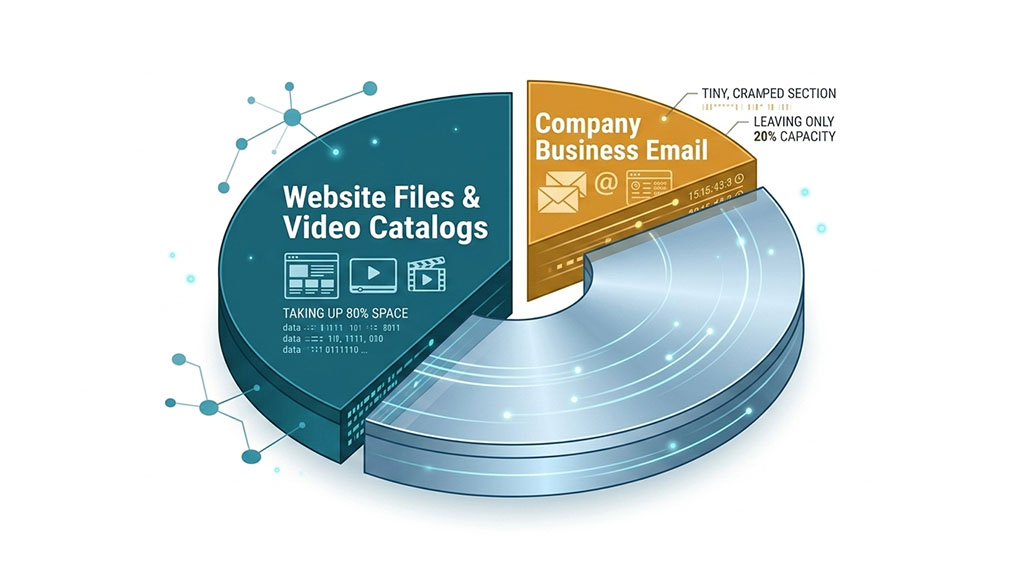
The platform gives u unlimited handles. Meaning, u can create sales@, hr@, finance@, and 50 other staff addresses. But here is the twist: all of those mailboxes are forced to feed out of the exact same tiny, rigid bucket of shared disk space.
Imagine your entire hosting plan disk size is capped at 10GB. That space isn’t just reserved for your communication. Your website files, database records, and high-resolution product catalog images sit inside that exact same 10GB bucket.
Worse yet, to save even more money, many budget web developers won’t even buy u a dedicated package. They buy one large, cheap reseller hosting account for themselves and quietly park 10 or 20 different client companies into that single space.
Your business is shared twice over without u ever knowing. Your critical business records are crammed into a tiny digital apartment building alongside complete strangers.
Yesterday, Mr. Tan’s marketing team uploaded a folder of heavy, uncompressed video files to the website gallery backend. Simultaneously, a random company sharing the developer’s hidden account started a massive file backup.
Invisibly, the server drive space filled to the absolute brim.
This morning, the storage ceiling crashed down. The total disk pool hit 100% capacity. Because the underlying shared space was completely choked, the email system threw a fatal error.
The “Unlimited” mailboxes vanished into thin air because there wasn’t a single megabyte of physical physical disk drive left to store a single sentence.
The Control Panel Confusion: Demystifying WHM and Plesk
When Mr. Tan called our helpdesk, his voice was tight and shaking with frustration. He was panicking. He was breathing heavily into the phone, telling us that their freelance web developer went missing and is not picking up his call.
He then say that the hosting company asked him to submit a ticket but he doesn’t know how to do it. It’s like he’s lost in an ALIEN world.
We calm him down & ask a few simple questions to identify the issue. Then we guided him step by step to troubleshoot his issues. We found out that the server infrastructure itself was running perfectly at 100% uptime.
The underlying problem was a structural misconception about how legacy email handles administrative systems, they ran out of disk space. In the world of legacy IT, a lot of compliance auditors & corporate teams get completely twisted up by control panel terms.
Just recently, an external corporate compliance officer called us, aggressively demanding that we audit a client’s server backend due to a major public security exploit circulating around cPanel and WHM login authentications.
“U need to check the WHM root access immediately to patch the bug,” the auditor barked over the line.
I stopped him calmly.
“Sir, we cannot check WHM. This server runs entirely on Plesk environment infrastructure.”
The line went completely quiet for three seconds. Then he repeated himself:
“Yes, but u still need to log into the WHM backend on top of Plesk to verify the patch.”
Aiyoyo! 🤦♂️ He didn’t understand the basic geography of a server.
Let me whisper a little secret into your ear so u look smarter than that auditor:
WHM (Web Host Manager) is the administrative engine that controls cPanel. They are a single package.
Plesk is a completely separate, independent competitor ecosystem. It does not have a WHM layer.
Asking me to check WHM on Plesk is like asking a mechanic to check the spark plugs on a fully electric Tesla 😂. It just doesn’t exist, honey.
This is the chaotic world of managing a legacy email setup.
When your business uses old Linux webmail setups, u r relying on systems like Roundcube – a bare-bones, text-only utility that was rushed in after the old Horde webmail platform completely died because it couldn’t support modern internet frameworks.
If u are on a Windows host, u are stuck dealing with basic tiers of SmarterMail that place a heavy chokehold on your user licenses the moment u hire an 11th staff member.
U are forcing your entire business to rely on fragile, outdated web utility throw-ins.
Drawing the Line Between Server Uptime and Device Setup
Let’s clear the air on how technical support actually works. The legal and operational job as a hosting infrastructure provider is to ensure the main pipeline is active, healthy, and flowing perfectly.
But manually configuring your local device, handling manual storage limits, and constantly clearing out your sent folders to avoid a system freeze? That is your internal operational burden that lands squarely on u as the business owner’s shoulders.
If a company wants to stop running its communication system out of a volatile shared box, the solution requires moving away from the web-server bundle model completely.
True operational stability only happens when you split your website data away from your communication data entirely. By migrating your communications to a dedicated cloud architecture, your email system operates in an isolated, enterprise-grade vault.
Your website can experience a massive traffic spike or a plugin crash, but your team’s communication never blinks.
The False Economy: Saving Ringgits to Lose Thousands
Let’s look at the actual math behind this setup, because numbers do not lie. Many local bosses stick with a basic legacy email system because they look at the spreadsheet and think:
“Wah, if I stick with this free hosting mail, I save RM150 to RM300 every single year!”
It looks like a smart, frugal business move on paper. But here is the real invoice that legacy tech eventually forces you to pay:
To save that RM150 a year, you are actively risking a RM80,000 corporate contract because your quotation bounced on a Monday morning.
To save a few Ringgits on a license, you are paying your sales team thousands in monthly salaries to sit around at their desks doing absolutely nothing for four hours because the mailbox is locked up.
That isn’t “SAVING MONEY.” That is a high-stakes gamble where the house always wins.
Let me confess something to u: I used to be fiercely anti-M365 years ago. I used to think it was just an overpriced, overhyped digital storage box.
Why pay a monthly subscription just to get a larger mailbox when free tools exist? But when we dwelled deeper into the architecture, it was a massive eye-opener for me.
Microsoft 365 isn’t an “email space upgrade.” It is a comprehensive business operational shield.
It replaces your fragile, manual setup with an automated ecosystem where enterprise-grade spam protection, real-time cloud data backup (OneDrive), and secure corporate collaboration (Teams) are tightly fused together.
It turns your communication system from a risky liability into an active productivity asset.

The Key Takeaway for Malaysian SME Bosses
Moral of the Story: Stop risking your multi-million ringgit business growth on a free website throw-in feature. The true cost of legacy email isn’t measured by what you pay your hosting provider – it is measured by the massive client deals you lose when your communication line goes completely dark. Invest in a real corporate foundation before the next system freeze costs you your biggest client.
Let’s look under your server’s hood, honey. Stop blindly trusting the “unlimited” banner your web guy showed you three years ago. Let’s find out if you’re shared-twice over or running on a modern foundation. Take our quick assessment, and let’s get you some real answers.
[ 🩺 Start your Free Infrastructure Health Check Now ] [ 👩🏻💻 Prefer a Chat? Click Here to Talk to Kim ]

Author
Kim (M365 Specialist)
Meet Kim, Cloudhappen's lead Digital Specialist. She has 15 years of hands-on infrastructure experience. Starting as a certified webmaster, she has successfully managed everything from custom VPS networks to advanced enterprise email security frameworks. Today, she functions as an approachable tech translator for local business owners - listening closely to their challenges & delivering direct, zero-jargon M365 solutions with prompt support.